Transitioning to a 4K broadcast workflow involves investing in a range of technologies and equipment that support high-resolution video production, from capture to delivery. This guide outlines the essential components and considerations for building an efficient and effective 4K broadcast workflow for your church.
Cameras
Key Features to Look For:
- 4K Resolution: Ensure the camera supports true 4K resolution (3840 x 2160).
- High Dynamic Range (HDR): Enhances the video quality by capturing a broader range of colors and light.
- Connectivity: SDI, HDMI, or IP outputs that support 4K signals.
- Frame Rates: Ability to shoot at various frame rates (24fps, 30fps, 60fps) depending on your production needs.
- Low-Light Performance: Useful for shooting in varied lighting conditions typical of worship settings.
Lenses
Considerations:
- Interchangeable Lenses: For versatility in different shooting scenarios.
- Wide-Angle and Zoom Lenses: To capture both wide shots of the congregation and close-ups of speakers.
- Aperture: Wider apertures (lower f-numbers) are better for low-light performance.
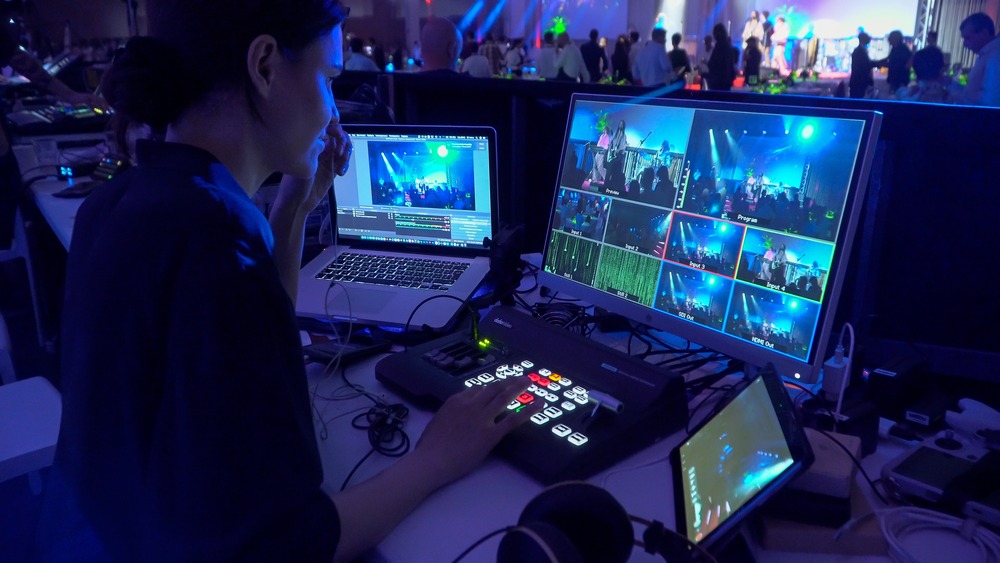
Video Switcher
Key Features to Look For:
- 4K Support: Ensure the switcher supports multiple 4K inputs and outputs.
- Multi-View: Allows monitoring of multiple video feeds simultaneously.
- Scalability: Capability to handle future expansions of your setup.
Cabling and Connectivity
Types of Cables:
- 12G-SDI Cables: For high-bandwidth 4K video signals over long distances.
- HDMI 2.0 Cables: For shorter distances or consumer-grade connections.
- Fiber Optic Cables: For very long-distance runs with minimal signal loss.
Accessories:
- Distribution Amplifiers: To split signals to multiple destinations.
- Converters: For converting between HDMI, SDI, and other formats.
Video Storage and Management
Key Features to Look For:
- High Capacity: 4K files are large, so you need substantial storage capacity.
- Fast Write Speeds: To handle the high data rates of 4K recording.
- RAID Configurations: For redundancy and data protection.
Popular Solutions:
- G-Technology G-RAID
- LaCie 6big Thunderbolt 3
- Synology NAS Systems
Editing Workstations
Specifications:
- Powerful CPU: Intel Core i9 or AMD Ryzen 9.
- High RAM Capacity: 32GB or more.
- Fast Storage: NVMe SSDs for quick access to video files.
- GPU: High-end graphics cards like NVIDIA GeForce RTX 3080 or AMD Radeon RX 6800 XT for smooth playback and rendering of 4K video.
- Editing Software: Adobe Premiere Pro, Final Cut Pro X, DaVinci Resolve, etc.
Audio Equipment
Considerations:
- 4K-Compatible Audio Embedding: Ensure audio gear can handle the higher data rates.
- High-Quality Microphones: Lavalier, handheld, and shotgun microphones for different scenarios.
- Mixers and Interfaces: Mixers should have enough channels for your audio inputs.
Monitors
Key Features to Look For:
- 4K Resolution: To accurately view the high-resolution content.
- Color Accuracy: High color accuracy monitors for precise color grading.
- Multiple Inputs: HDMI, SDI, and DisplayPort for flexibility.
Live Streaming and Distribution
Key Features to Look For:
- 4K Streaming Capabilities: Ensure your streaming platform supports 4K resolution.
- High Bandwidth: Reliable high-speed internet connection.
- Encoding Hardware: Dedicated encoders like the Teradek Cube 755 or software-based solutions such as OBS Studio or vMix.
Streaming Platforms:
- YouTube
- Facebook Live
- Vimeo Livestream
Lighting
Considerations:
- LED Panels: Energy-efficient and provide consistent lighting.
- Softboxes and Diffusers: To soften harsh light and reduce shadows.
- DMX Control: For adjustable lighting scenes.
Network Infrastructure
Considerations:
- Robust Network Switches: To handle the high data transfer rates of 4K signals.
- Cat6 or Cat7 Cables: For fast and reliable network connections.
- Wi-Fi 6 Routers: For wireless devices supporting high-speed internet.
Building a 4K broadcast workflow requires careful planning and investment in the right technology. By selecting high-quality cameras, lenses, video switchers, and ensuring robust connectivity and storage solutions, your church can deliver exceptional video content that enhances worship experiences and reaches a wider audience. Regularly updating your equipment and staying informed about technological advancements will help maintain a cutting-edge broadcast setup that meets the growing demands of high-resolution video production.